
Apartments + Edit UI
Schedule
Sub-tasks
No sub-tasks.
Notes
Specification (from Trello)
Apartment & House System
Works the same as the hotel system, but with NO reception UI. Instead you go up to an apartment or house door / mailbox to interact.
SOME OTHER UI EXIST ON THE EDITING UI OF FURNITURE: I CAN SEND THIS UPON REQUEST, DM ME WHEN YOU GET HERE. I RESPOND QUICKLY.
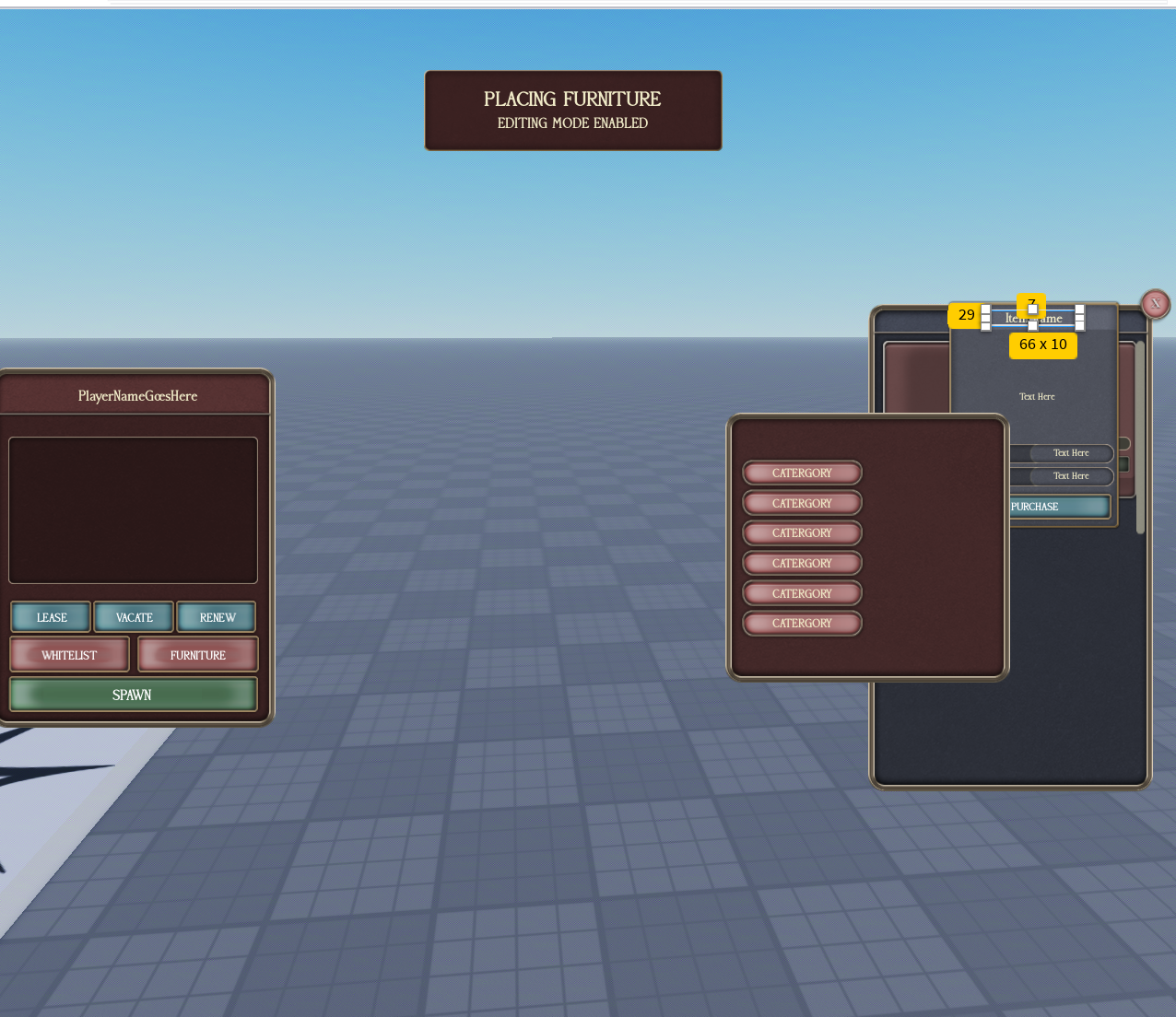
[IMAGE 1: apartment1 edit-mode owner panel + furniture shop ("PLACING FURNITURE / EDITING MODE ENABLED")] [IMAGE 2: rooms3 owner/rent UI]
Mailbox / door interaction (UI name: rooms3)
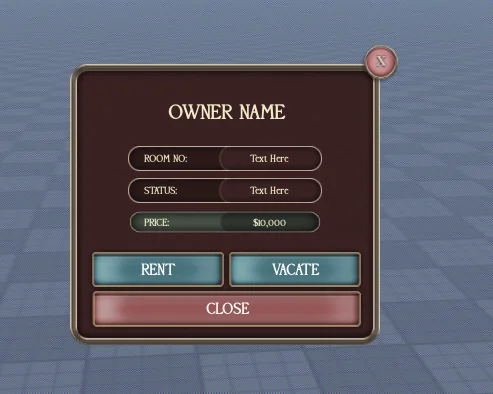
You go up to the mailbox of a house (or the door of an apartment). At rooms3 you can:
- See the owner.
- See the status (whether it's rentable).
- See the current lease period.
- If it's unowned, you can lease it.
Where rooms3 lives:
- For houses: rooms3 is on the mailbox adjacent to the house.
- For apartments: add it to the door. It's just a proximity prompt, so we can place it around as needed.
rooms3 UI (image 2): shows OWNER NAME, ROOM NO, STATUS, PRICE, and buttons RENT, VACATE, CLOSE.
Owner panel (UI name: apartment1)
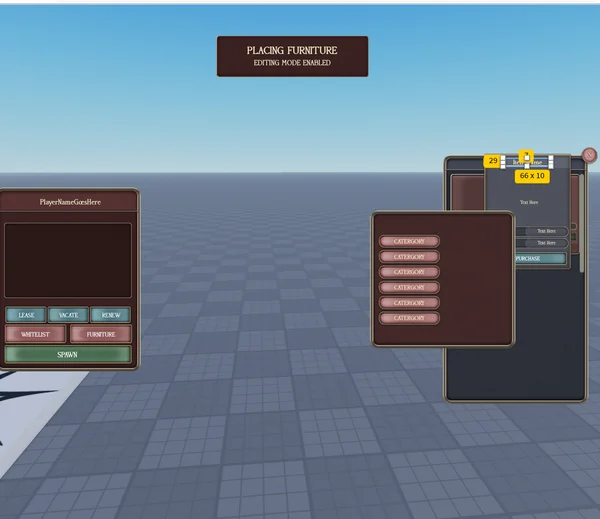
This is the more detailed ownership panel for the person who owns/leases the place (image 1, left). It shows the player name and has these buttons:
- LEASE
- VACATE
- RENEW
- WHITELIST (opens the whitelist UI, below)
- FURNITURE (enables edit mode, below)
- SPAWN
Whitelist
The WHITELIST button opens a UI where you can whitelist people to get access to the door. Add people to the list, and whitelisted players can open/enter even though they aren't the owner.
Doors
- On all house/apartment doors, the owner can control the door.
- Same lock / close / open functionality as the apartment doors detailed in the hotel spec.
- Whitelisted players (from the whitelist UI) can also access the door.
Breach functionality
- If you have a tool named "breach", you can break down the door by holding the proximity prompt.
- Plays a break sound.
- The breach resets after 2 minutes.
- Good for when police raid the house.
- You can also break in with lockpick. 40% chance of managing to breach the door down.
Edit mode (furniture placement)
The FURNITURE button on apartment1 enables edit mode (image 1, "PLACING FURNITURE / EDITING MODE ENABLED").
Placement rules:
- You can place and move furniture ONLY INSIDE the apartment/house.
- There is a max amount of furniture you can place.
- You can't place furniture that collides with other furniture.
While edit mode is on:
- The furniture place/move UI is visible.
- No other UI shows on screen while this is on.
- Make it easy to get out of.
Furniture shop (inside edit mode): (image 1, right — categories list + item detail with size like "66 x 10" and PURCHASE)
- While in edit mode you must be able to buy furniture in a shop, browsable by category.
- When you buy it, add it to some sort of inventory in edit mode so it's stored.
- You must be able to remove furniture. When you remove it, it goes back into the inventory.
- Or you can sell the furniture. Selling adds money to the economy UI, and the sell price is 50% less than the purchase price.
Pictures
No extra pictures yet.