
COMMISSION BOARD
OCTAVIUM · TOULOUSE V2
Cutscene system
Schedule
Sub-tasks
No sub-tasks.
Notes
Specification (from Trello)
Cutscene & Dialogue System
What it is
A basic system where we can create cinematic intros for the game and tutorials, editable through a config, using the cutscene UI. It also covers interaction with NPCs linked to AI, where you can talk with people in-game. The AI’s role would be to make variants of all the messages, so there’s new messages every single time and different choices.
UI location: [fill in]
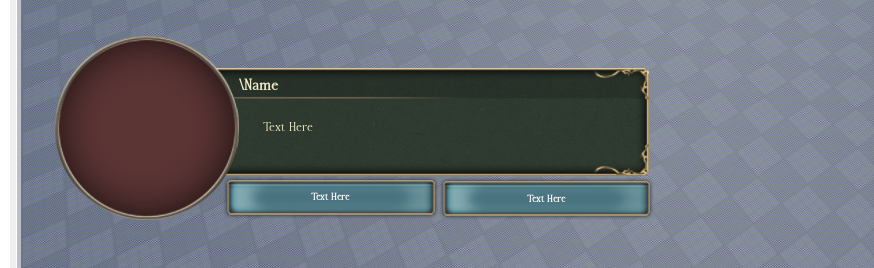
The cutscene UI (from the picture)
A dialogue box with:
- A round portrait on the left (the speaker's image).
- A Name field at the top.
- A text area for the line being spoken.
- Two buttons underneath for responses / choices ("Text Here" x2).
Cutscene / tutorial system
- Cinematic intros and tutorials are built through a config, so a non-scripter can set them up.
- TPs player to different locations in-game to explain things and concepts. Trigger from proximity prompt or first time walking inside buildings.
- The config defines a sequence of steps: speaker name, portrait, the text shown, and the choice buttons (with what each choice does or where it leads next).
- This drives the cutscene UI above. Used for the game intro and for tutorials.
AI NPC dialogue
- NPCs can be linked to AI so players can actually talk with them in-game.
- The player walks up to an NPC, opens the dialogue, and can have a back-and-forth conversation through the same UI.
Notes / to fill in
- UI location.
- Which AI provider/model the NPC talks to.
- How config steps are structured (any examples you want to lock in).
- Sounds and polish (typing sound, advance sound, etc.) if wanted.
Pictures
No extra pictures yet.
OCTAVIUM · TOULOUSE V2 · MODERATED UNDER RODEVS & HIDDENDEVS