Character Loadout GUI
Schedule
Sub-tasks
No sub-tasks.
Notes
Specification (from Trello)
Character Loadout System
What it is
The Character Loadout system is where players dress their avatar. You have seperate folders holding all the models (webbings, army hats, uniforms etc.), a config that references them, and a part in each model that says how it should sit on the avatar. Head for hats, and middle for webbings. The GUI is where the player browses and equips uniforms, hats, webbings etc. Super interactive sounds etc is a must.
Items are split into categories: face, hats, uniforms, webbings, accessories. What a player can see and equip is different based on the team they are on and the group IDs they are in. Each item appears visibly on its own frame. While in this UI, the player is in a separate room where they watch their avatar get dressed live as they equip things.
UI location: BaseUI, characterloadout.
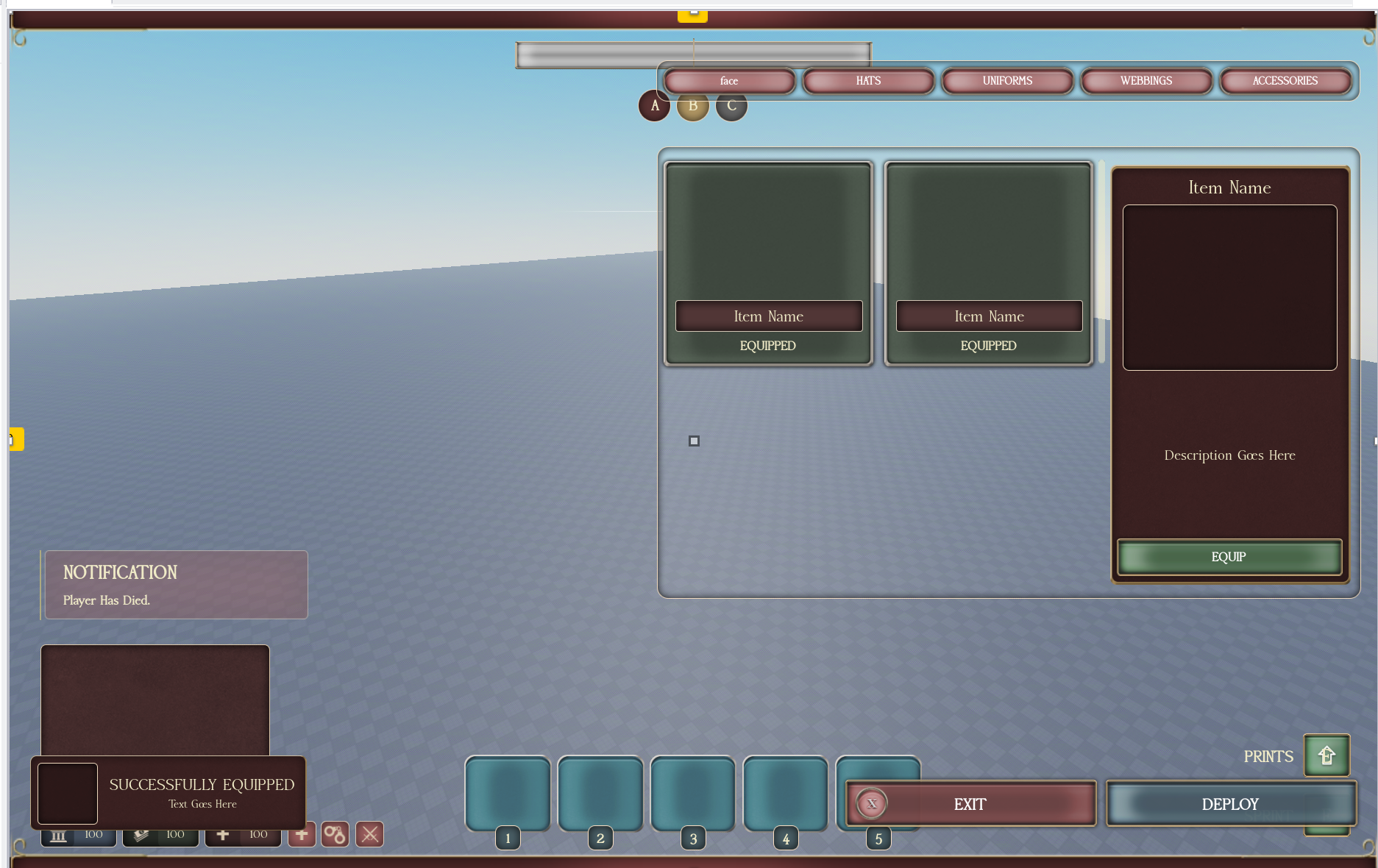
[IMAGE: picture of UI]
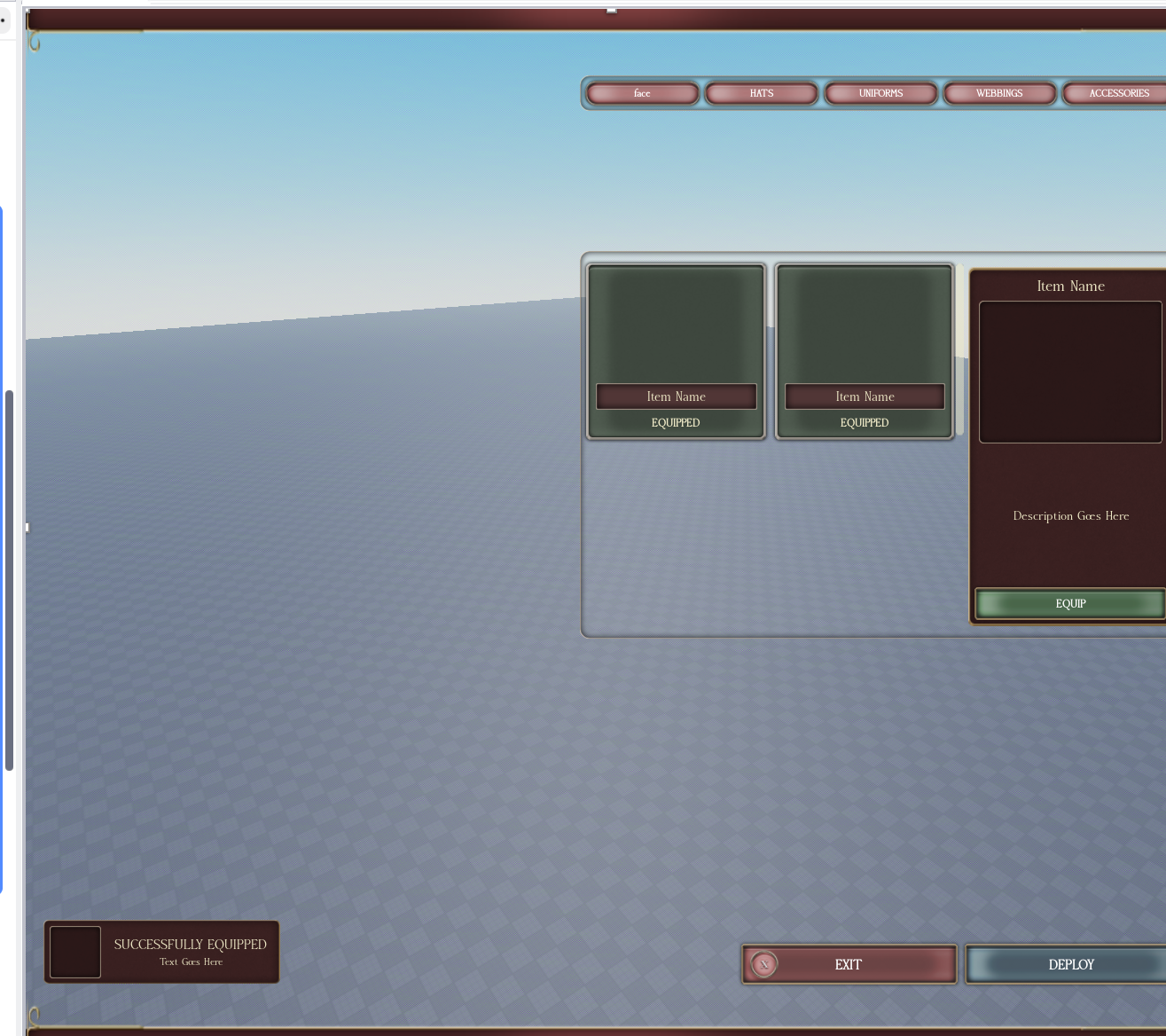
How the GUI should work (from the picture)
Category tabs (top right): face, HATS, UNIFORMS, WEBBINGS, ACCESSORIES. Clicking a tab loads that category's items into the grid below. Only show items the player is designated for (their team + their rank in the relevant group). Locked items they don't qualify for are not shown.
Item grid (the two big frames): each available item in the selected category gets its own frame. The item's name shows on the frame, and if it's currently worn the frame says EQUIPPED. The item should be visible on its frame, not just text. When a user is not looking at details, the ITEM grids should fill the entire box. Let there be no strange vaccum besides the GRIDS when the details panel is not present.
Detail panel (right side): when an item is clicked, this shows the Item Name, a preview, and a Description. The EQUIP button at the bottom equips that item. If already equipped it should let you unequip. If you click the item again, the equip frame goes away. The equip frame area should only be on screen when a user is looking at details.
Equip rules: respect the config per category. Some categories only allow one item at a time (uniform, hat), some allow multiple (face, neck, hair), some allow none.
Saving / persistence: when a player puts together an outfit, it saves and stays equipped until they change it. This is per team. So when they come back onto that specific team, their saved outfit for that team is still on. A different team has its own saved outfit.
Live dressing room: the player stands in a separate room and the avatar updates instantly when they equip or unequip, so they see exactly what it looks like.
Notifications: use the seperate notification UI. On equip show "SUCCESSFULLY EQUIPPED" with the item name (see the bottom-left notification in the picture). This is not UNIVERSAL NOTIFICATION UI. This is a seperate one. NO OTHER UIS CAN BE PRESENT WHEN LOADOUT IS ACTIVE!
Bottom bar: EXIT closes the loadout. DEPLOY spawns the player into the game with the current loadout.
Super interactive, sounds on tab switch, equip, deploy etc. This is a must.
What already exists (the old system, added as TXT files)
The config and the wearing/welding logic are already built. I added them as TXT files:
- OldSystem\_CosmeticConfig\_NOTE.txt
- OldSystem_CosmeticHandler.txt
- OldSystem_Utility.txt
What they already do for you:
- CosmeticConfig holds every item, grouped by category, each with its model and a lock (group rank range + team) that defines who can equip it.
- Utility.isDesignated is the check for whether a player qualifies for an item (team + group rank). Use this to filter what the GUI shows.
- Utility.wearCosmetics / attachCosmetic clone the model, find the middle part (the "how it sits on the avatar" part), pivot it onto the matching body part and weld it on. Shirts/Pants apply by template. This is the welding you do NOT need to rewrite.
- CosmeticHandler listens on the equipCosmetics remote, saves the player's selection so it persists through respawns, and clears it on team change. Note: it has a
--TODO: check for permissionthat still needs the designation check added server-side so players can't equip items they aren't allowed.
So the job is the characterloadout GUI itself plus wiring it to the existing remote and config, and the per-team saving above. The dressing/welding backend is done.
Pictures